How to print multiple pages per sheet from a PDF
Slides as handouts, notes for revision, or a long draft to proofread on less paper.
By PDFCheetah · 21 Nov 2026 · 3 min read
Meera lectures in Pune and wanted her 60-slide deck as handouts for 40 students. One slide per sheet would have meant 2,400 pages. At six per sheet it came to ten sheets each.
Put multiple pages on each sheet
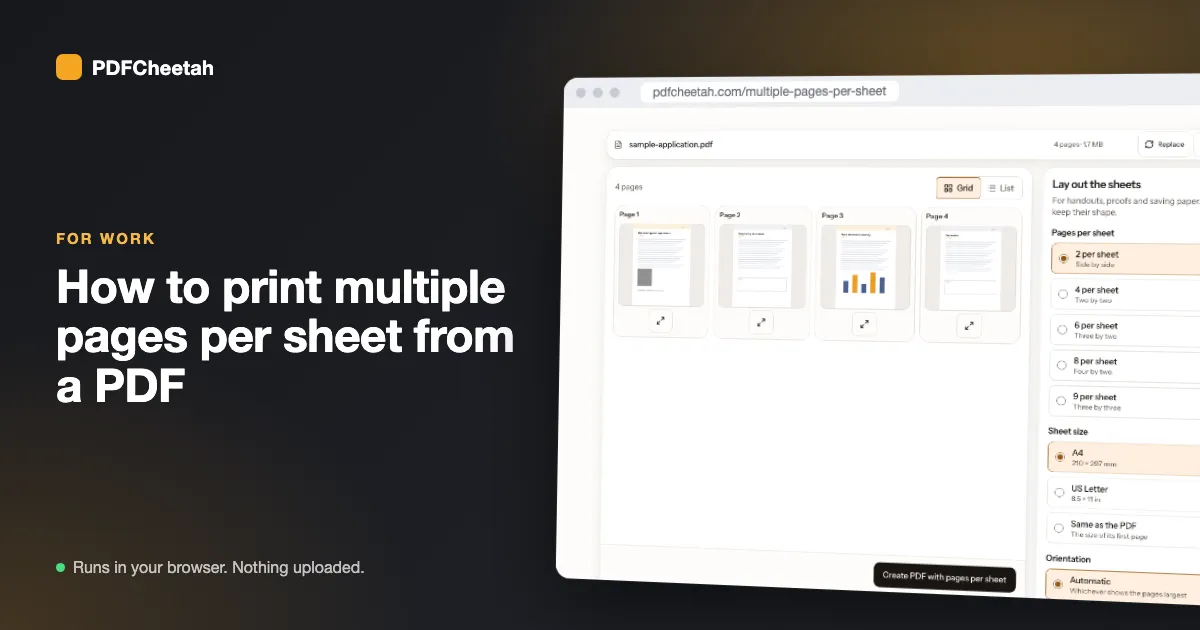
- 1Open Multiple Pages per Sheet and add your PDF.
- 2Choose how many pages go on each sheet: 2, 4, 6, 8 or 9.
- 3Choose the sheet size: A4, US Letter, or the same as the PDF.
- 4Pick the order (across then down, down each column, or from the right) and the margins. Add a thin border around each page if you like. The small sheet beside the settings shows where each page lands.
- 5Select Create PDF with pages per sheet, then Download, and print it as it is.
Each page is placed as itself, not as a picture of itself, so the text stays sharp in print. It's only smaller. Nine to a sheet draws each page about a third as wide as the sheet, which small type may not survive.
One page per sheet, on different paper
Sam in Leeds was sent a conference pack on US Letter paper and only had A4 in his printer. For one page per sheet, PDF to A4 scales each page to fit and centers it. Nothing is cut off: a Letter page shrinks by about 3 percent and gets a thin white band above and below.
Pages to drop or reorder before printing? Do that in Organize PDF first, then combine the result.
More video tutorials
What Multiple Pages per Sheet won't do
- Make a booklet to fold and staple. Pages are placed in reading order only.
- Keep links working or comments editable. Comments and filled-in fields are drawn onto the sheets as they look.
- Open a password-protected PDF. Use Unlock PDF first.
Questions people ask
How many slides per page should I print?
Six or nine for slides with large text. Two or four for pages of ordinary text, so it stays readable on paper.
Will the text be blurry?
No. Each page is placed on the sheet as it is, not as a picture, so text stays sharp and photos keep their resolution. It's just printed smaller.
What happens on the last sheet?
If the page count doesn't divide evenly, the last sheet is partly blank. The pages on it stay the same size as the rest.